
When Projects Don’t Go to Plan: What Are We Missing?
An introduction to Project Intelligence: connecting field information, decisions and action.
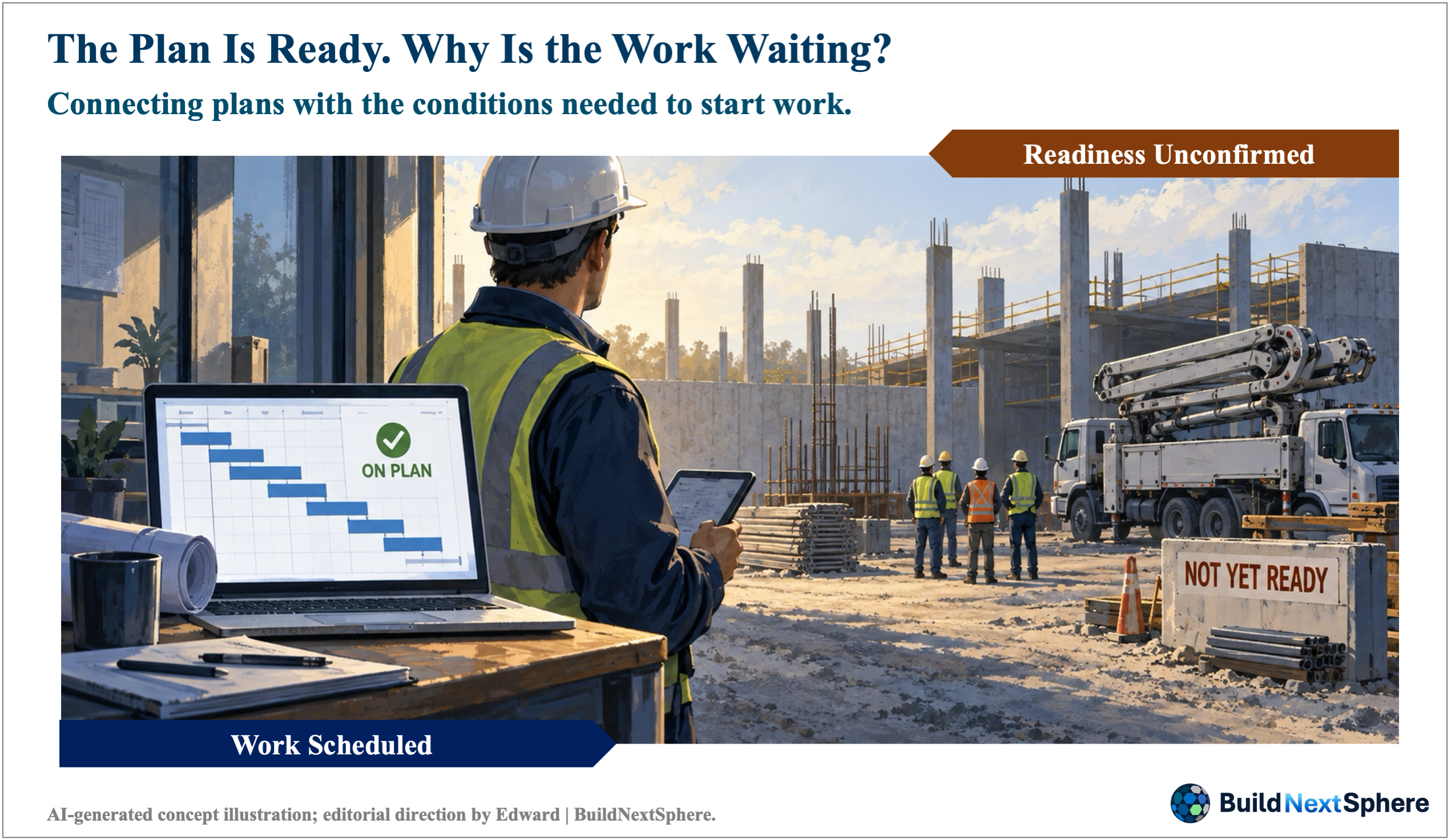
– Figure 01. The Plan Is Ready. Why Is the Work Waiting?
– Note: A hypothetical scene illustrating the distinction between scheduled work and confirmed work readiness. It is not a photograph of an actual project.
– Source: AI-generated concept illustration; layout and editorial direction by Edward | BuildNextSphere.
01. Tomorrow’s Work Is Planned. Is It Ready?
A planned start
Consider a hypothetical construction project. Concrete placement in Area A is scheduled for tomorrow morning. The reinforcement team has reported completion, the activity appears in the daily plan and the supervisor expects the crew to start on time. Yet the inspection has not been confirmed, the concrete pump is also requested in Area B and nobody has verified that the delivery route will remain available.
The question behind the delay
The schedule is not necessarily wrong. It expresses an intention, but the conditions needed to carry out that intention still require attention. Another report may describe the situation without settling what happens next. The useful question is more specific: what is preventing this activity from proceeding, who can resolve it and what evidence would establish readiness? Not every delay begins this way. Design changes, funding, physical conditions and external approvals can create different problems. This example offers a starting point for examining the connection between information and action.
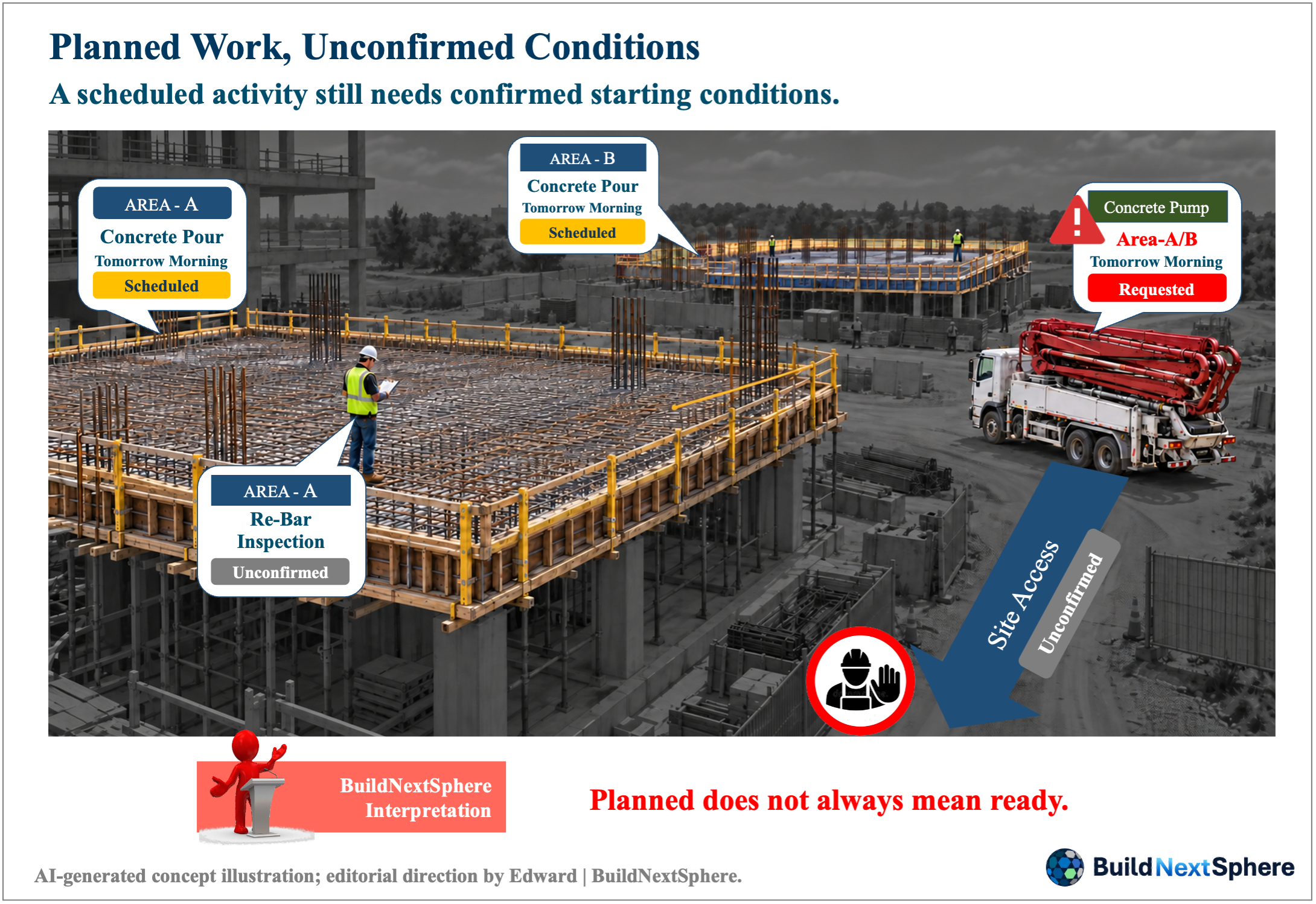
– Figure 02. Planned Work, Unconfirmed Conditions
– Note: A hypothetical construction scenario showing unconfirmed inspection and access conditions, with the same concrete pump requested by two work areas.
– Source: AI-generated concept illustration; editorial direction by Edward | BuildNextSphere.
02. Project Intelligence Starts with a Clear Distinction
Plan, progress and readiness
Three questions help separate the information. The plan describes what should happen, when and how. Progress describes completed work against that plan. Readiness concerns whether the next activity has the conditions it requires. In our example, a reinforcement completion report answers a progress question. It does not, by itself, confirm the inspection, pump allocation or access needed for concrete placement. Calling an activity on track is therefore not a substitute for examining its starting conditions.
A working definition
Through BuildNextSphere, I use Project Intelligence to mean the ability to interpret plans, field facts, constraints, resources and changes together, support a responsible decision and learn from the result. This is a working definition for this series, not an official standard or the name of a validated software product. Its value should be judged through the work it supports: whether people understand the situation, recognise what remains uncertain and know what action is needed. A dashboard may help, but the operating responsibility cannot remain inside the dashboard.
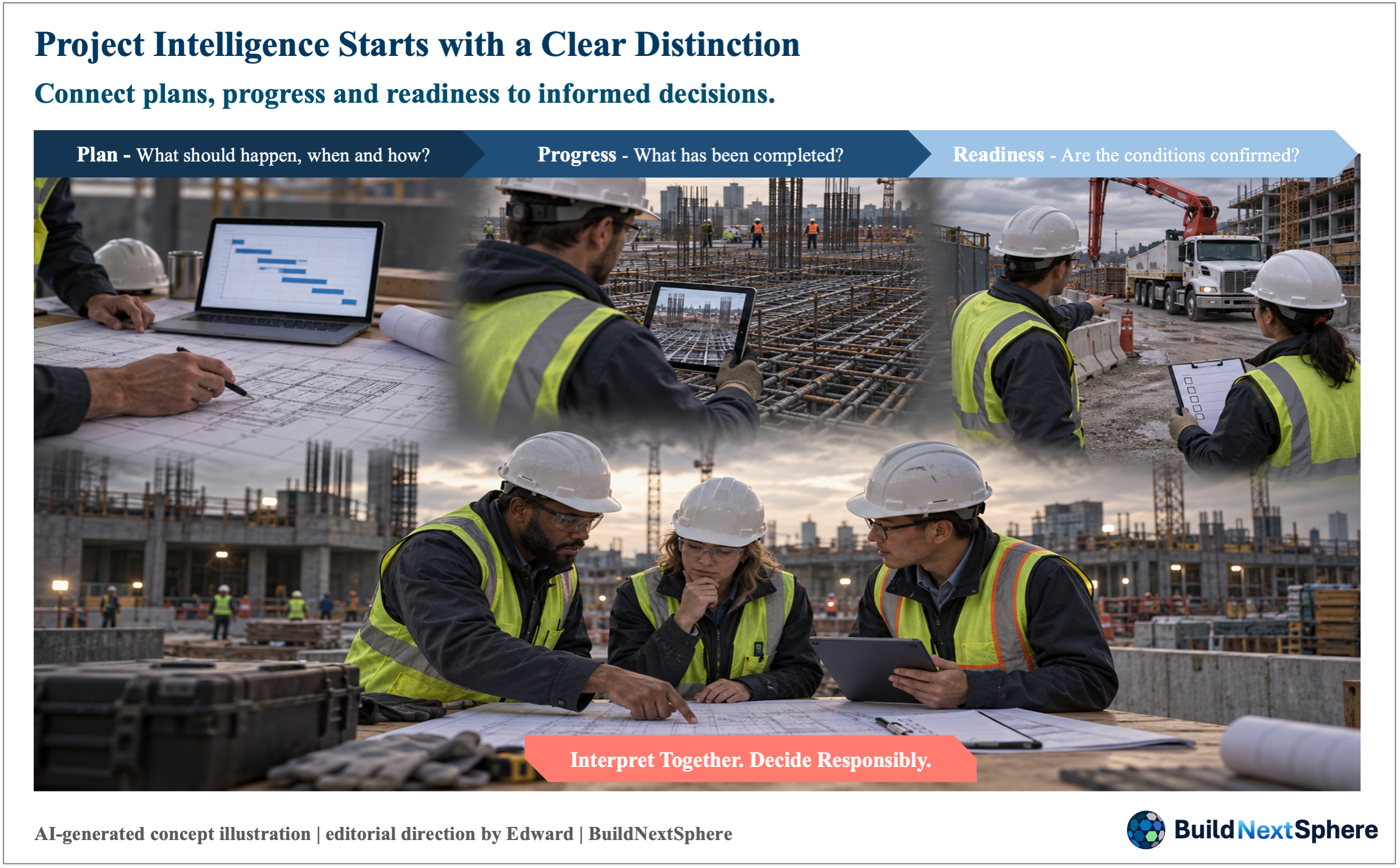
– Figure 03. Connecting Plans, Progress and Readiness to Decisions
– Note: Illustrates BuildNextSphere’s working definition of Project Intelligence through planning, progress observation, readiness checks and human judgement. It does not represent an official standard or a validated software platform.
– Source: AI-generated concept illustration; editorial direction by Edward | BuildNextSphere.
03. Build a Shared View of One Activity
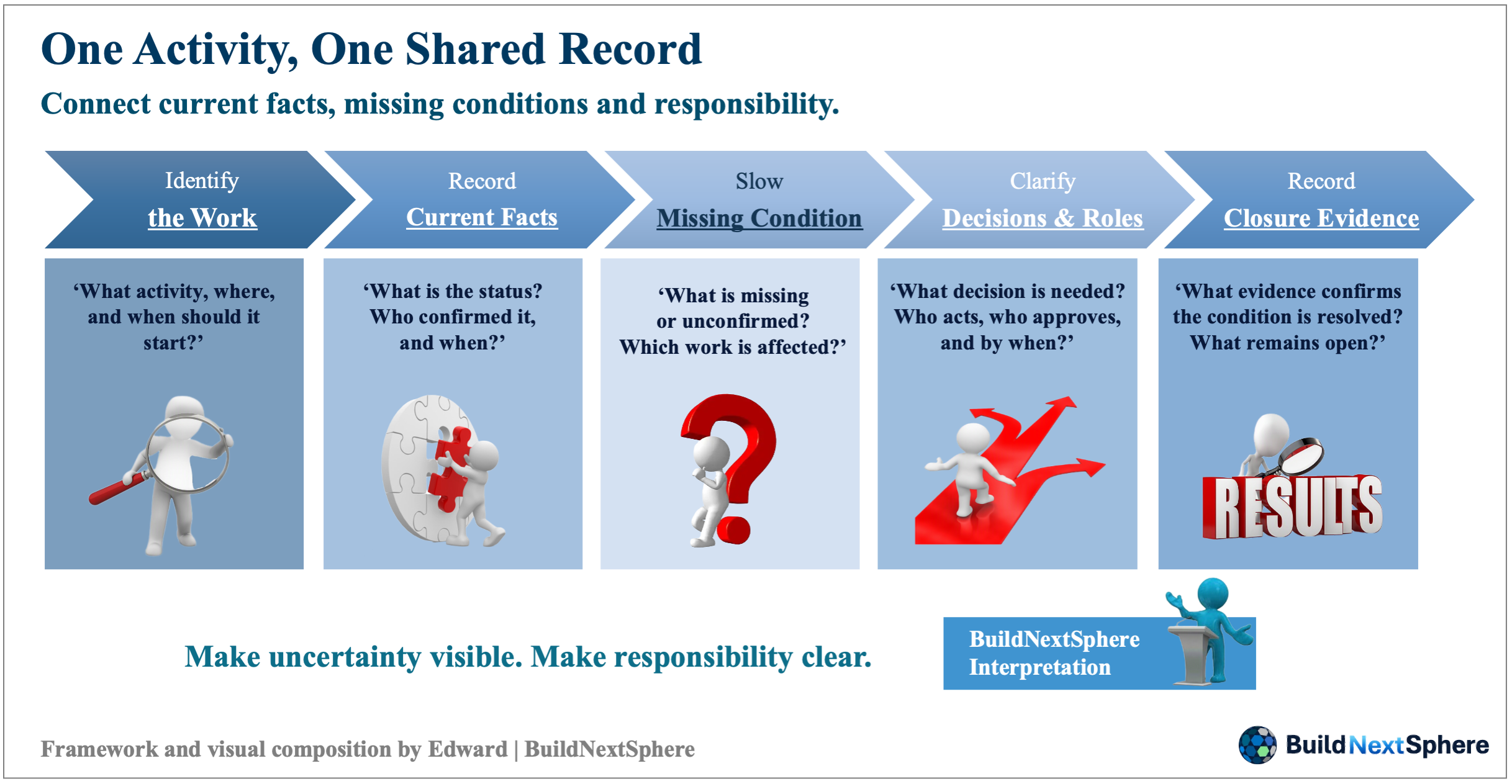
– Figure 04. One Activity, One Shared Record
– Note: A proposed structure for an activity-level record. Keep unconfirmed information explicit and distinguish observations, proposed responses and approved instructions. Adapt the checks to the activity and retain applicable project procedures and authorised reviews.
– Source: Framework proposed by Edward | BuildNextSphere.
Connect the record to the work
For Area A, start with a record that identifies the activity, work area and intended start time. Add the current status, its source and when it was last confirmed. Then record each missing condition, the affected work, the decision needed, the action owner, any required approver, the deadline and the evidence needed to close the action. This is a proposed minimum record, not a requirement to collect every available data point. Each field should help someone understand or resolve the problem.
Keep uncertainty visible
An empty inspection field should mean “not confirmed,” not “nothing is wrong.” A pump booking should identify the relevant period, not simply say “available.” If the access information came from yesterday’s walk-through, someone must check whether it still describes tomorrow’s conditions. When records disagree, retain the conflicting information until the responsible person resolves it. Replacing uncertainty with a reassuring colour may make the report easier to read while making the actual decision harder.
Check conditions appropriate to the activity
The checks should fit the activity. People, materials, equipment, permits, utilities and access may matter, alongside required quality and safety arrangements. Night work or a shift change may introduce additional handover needs. This is not a complete construction checklist or permission to start work. The project’s applicable procedures and authorised reviews remain necessary. The practical aim is to connect those conditions to the same activity so that different teams are not discussing different versions of “ready.”
An actionable entry
For example, “access unconfirmed” becomes more useful when it includes who will inspect the route, when confirmation is needed and which delivery depends on it. The record should distinguish an observation from a proposed response and an approved instruction. That separation lets the next shift understand not only the latest status, but also what still requires a decision.
04. Turn Missing Conditions into Decisions and Support
Compare options, not just requests
The pump conflict needs more than two requests in an inbox. The team needs to examine the planned sequence in Areas A and B, the consequences for following activities and the feasibility of alternative arrangements. Moving one pour may affect another crew or delivery. Another pump may not be available or appropriate. These are options to investigate, not automatic solutions. The person authorised to decide needs the relevant facts and constraints before selecting a response.
Give each action an owner
The inspection, equipment allocation and access questions should each have an owner and a time for confirmation. The person providing an update may not be the person authorised to approve the resulting action. Keep that distinction explicit. A revised sequence does not remove inspection or safety requirements, and urgency should not be treated as approval. If the required decision exceeds site authority, identify the project manager, headquarters function or client representative whose involvement is needed under the project’s arrangements.
Connect meeting rhythms
Daily coordination can address immediate starting conditions, while a weekly review can look further ahead at repeated conflicts and approaching resource needs. Escalation should communicate the decision required, its timing and the consequences of waiting—not merely forward a long report. The appropriate rhythm depends on the project. What matters is that a problem has a route to someone able to act, and that the person raising it can see what was decided.
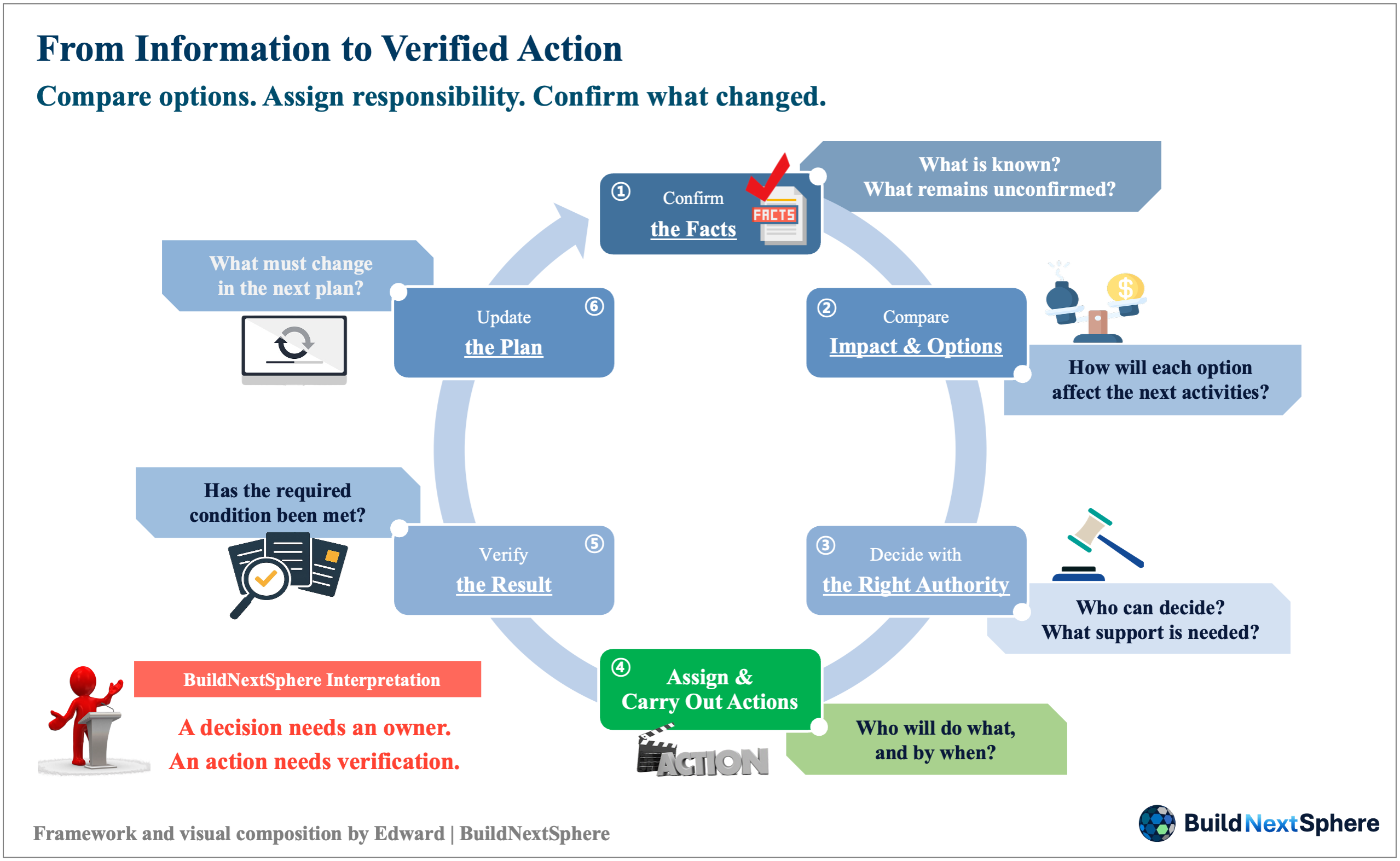
– Figure 05. From Information to Verified Action
– Note: A proposed coordination process linking confirmed facts, option assessment, authorised decisions, assigned actions and result verification. Adapt responsibilities and review timing to the project. Required inspections and safety approvals remain applicable when work is resequenced.
– Source: Framework proposed by Edward | BuildNextSphere.
05. Check What Changed, Then Update the Plan
Close the condition, not the message
In the hypothetical example, sending an inspection request does not establish that the inspection is complete. Confirming a pump allocation does not establish that the pump arrived when needed. The team should check the evidence of readiness, then record what actually happened. If the activity still cannot proceed, keep the unresolved condition visible. Update the relevant forecast or planning assumption through the project’s agreed process rather than silently rewriting the original commitment.
A lesson from field experience
On a large overseas underground project, I contributed to developing and introducing a mobile work-management system linked to control-room coordination. Field updates and equipment information were connected parts of the arrangement. For me, the lesson was not simply that more information could be displayed. People still had to understand that information and organise a response. This anonymous field account is separate from the hypothetical pour; it does not establish a measured improvement or describe the historical system as AI.
Learn from a defined record
For a future trial, a team might track decision waiting time or actions reopened after being marked complete. Define the measure and record a baseline first. Changes in staffing, scope or site conditions also belong in the record; a better result should not automatically be attributed to the tool.
06. Eight Areas, One Connected Project
A map for the series
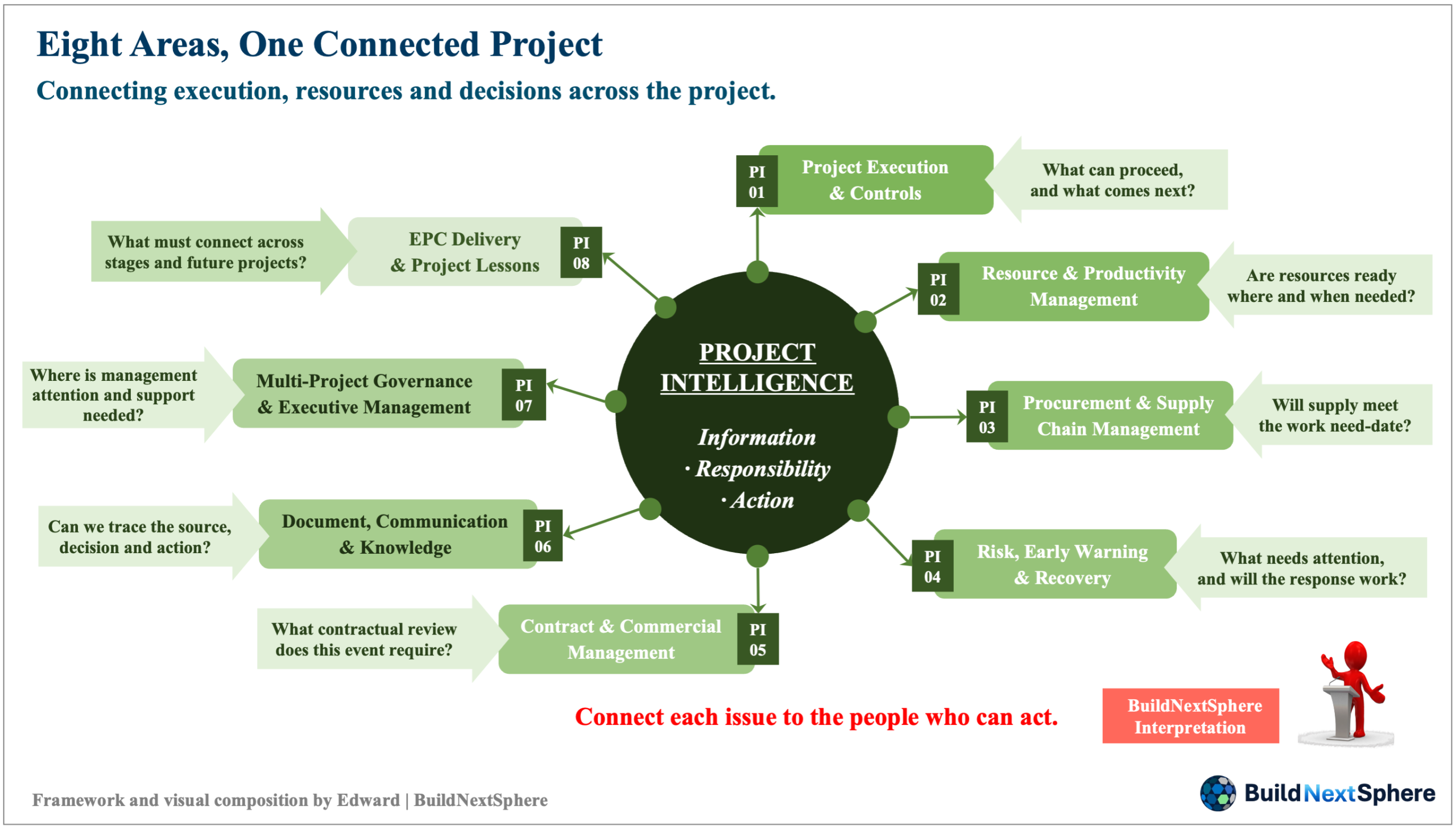
– Figure 06. Eight Areas, One Connected Project
– Note: A reading map for BuildNextSphere’s planned Project Intelligence series. The eight areas represent connected management topics, rather than sequential stages or verified capabilities of an existing platform.
– Source: Content framework proposed by Edward | BuildNextSphere.
One activity makes the discussion concrete, but Project Intelligence must also look beyond the work area. BuildNextSphere’s planned series explores eight connected areas. Each begins with a practical question and develops toward concepts, field difficulties and potential responses. These are directions for investigation, not claims that a complete platform already delivers every capability.
PI-01 & PI-02
Project Execution & Controls connects the master plan, work packages, actual progress and forecasts: what can proceed, and what does today’s position mean for later milestones? Resource & Productivity Management examines people, equipment and materials against the activity’s needs: are they available at the right place and time, and what explains waiting or underuse?
PI-03 & PI-04
Procurement & Supply Chain Management links delivery expectations to when the work actually needs an item, including the response when supply will not meet that date. Risk, Early Warning & Recovery asks which developing condition needs attention, how its impact may spread and whether a recovery action addresses the cause rather than only changing a status label.
PI-05 & PI-06
Contract & Commercial Management examines how a field event reaches the people responsible for contractual review, notices and commercial assessment. Requirements must be checked against the applicable contract. Document, Communication & Knowledge asks whether the team can find the current source, understand the decision, confirm the action and retain a record that another person can use.
PI-07 & PI-08
Multi-Project Governance & Executive Management brings the discussion to leadership: which project needs attention, what support is required and who can authorise it? EPC Delivery & Project Lessons follows engineering, procurement, construction and handover together, asking what must pass between stages and which experience should change the assumptions of the next project. Across all eight areas, the common thread is information connected to responsibility and follow-through.
Connections without losing context
The purpose is not to give every issue to every department. It is to recognise when an activity-level condition needs procurement help, a contractual review or management support, and to pass along enough context for that person to respond. Later articles will examine these connections in greater detail, including the limits of standardised records when projects differ in scale, stage and operating conditions.
07. Start with One Activity at Your Next Meeting
A small, practical start
At your next work meeting, choose one activity that is not moving as intended. Write down the current facts, the missing condition, the affected work, the decision needed, the owner and deadline, and how the result will be checked. Ask the participants whether those entries describe the same situation. A shared paper record or spreadsheet may be sufficient to begin; defining responsibility does not need to wait for new software.
The direction ahead
This is the direction I want to explore through BuildNextSphere: helping people interpret project conditions and make decisions they can act on and verify. BNS Project Intelligence Sphere Platform may eventually support parts of that work, such as identifying missing or conflicting information. That remains a development direction, with human review and authority still essential. The starting question is not how much information a system can collect, but whether the team knows what needs to happen next—and checks that it happens.
Closing message
Connect the facts. Assign the action. Verify the result.

– Figure 07. Connecting Plans, Progress and Readiness to Decisions
– Note: Illustrates BuildNextSphere’s working definition of Project Intelligence through planning, progress observation, readiness checks and human judgement. It does not represent an official standard or a validated software platform.
– Source: AI-generated concept illustration; editorial direction by Edward | BuildNextSphere.
Sources
No external sources cited.
Basis of This Article
This article presents Edward Kim’s practical perspective and BuildNextSphere’s proposed Project Intelligence framework. The concrete-placement scenario is hypothetical. The anonymous underground-project account draws on Edward’s direct experience and is not an independently evaluated case study.
The definitions, records and workflows presented here are proposals for discussion—not official standards, complete operating procedures or evidence of a validated software platform. Their application requires review against the project’s conditions, applicable procedures and authorised responsibilities.
Image credits and explanatory notes are provided beneath each figure.
Related Reading
Explore more from BuildNextSphere:
- Why Doesn’t Better Technology Always Deliver Better Construction Results?
- Why Do Some Countries Advance While Others Miss Opportunities?
- The Future of Construction: Which Technologies will Really Change the Site?
- Between the Plan and the Site: How Can AI Support Project Execution?
BuildNextSphere
BuildNextSphere connects Development, Technology & Project Intelligence through practical, experience-informed content.
About the Author
Edward Kim is the Founder of BuildNextSphere.
He draws on his experience with overseas construction projects to share practical insights from field operations, project delivery, and IT-enabled working systems. Through BuildNextSphere, he explores how people, technology, and real project conditions can help turn plans into action and support better project outcomes.
Content & IP Notice
This article and related materials are prepared and published by BuildNextSphere. Unless otherwise stated, the original structure, wording, diagrams, frameworks, and visual materials are the intellectual property of BuildNextSphere and Edward Kim.
BuildNextSphere, its logo, tagline, and brand assets are part of the BuildNextSphere brand identity. Unauthorized reproduction, modification, redistribution, or commercial use is not permitted without prior written consent.
Third-party names, technologies, or references are mentioned for informational purposes only and remain the property of their respective owners.
9 Responses